

Running an online store is not a one-time setup task. Once your products are listed and your checkout is working, the real work begins. Stores that stay inactive — showing the same homepage banner for months, no new products, no updates — quietly signal to visitors that nobody is home. Shoppers notice, and they leave without buying.
Keeping your online store active and engaging means creating a space that rewards return visits. When people come back and find something new — an updated promotion, a fresh review, a helpful guide — they are more likely to trust you, browse longer, and eventually buy. This guide walks you through practical methods to keep your store visibly alive, consistently useful, and built to hold attention over time.
Keep Your Storefront Visibly Fresh
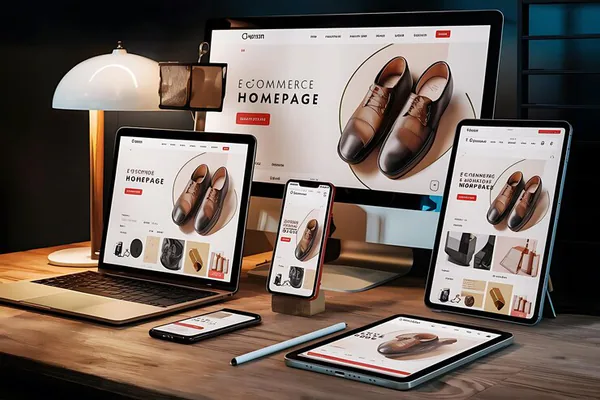
Your homepage is the front window of your store. If it looks the same every month, it signals that nothing interesting is happening. Regular updates to your storefront — even small ones — keep it looking active and trustworthy.
Update Banners and Featured Sections Regularly
Swap out your main promotional banner at least once a month. Align it with seasons, events, or new arrivals. If it is mid-summer and your banner still says “Spring Sale,” customers will question how attentive you are to your own business. Even a simple headline change makes the page feel current.
Rotate Featured Products
Rotating your featured products keeps the homepage interesting for repeat visitors. Use this space to highlight:
- New arrivals or recently restocked items
- Best sellers from the current month
- Products that fit the current season
- Items you want to move quickly
Visitors who see a different featured product on their second visit understand that your store is actively managed.
Add a What’s New Section
A dedicated section showing your most recently added products tells customers exactly where to look for something fresh. This is especially valuable for repeat buyers who already know your catalog and are checking back for updates.
Refresh Product Pages With Useful Details
Many store owners write a product description once and never touch it again. But product pages are not static documents — they can be improved and expanded over time. Refreshing them improves both conversions and search visibility.
Add Customer-Relevant FAQs
Every time a customer asks a question about a product, that question belongs on the product page. A short FAQ section answers common doubts before they become reasons not to buy. Over time, these build into a genuinely helpful resource that also signals to search engines that the page is thorough and current.
Show Stock Signals Clearly
Dynamic stock messages — “Only 3 left,” “Back in stock,” “Ships in 2 days” — make product pages feel live and responsive. These small signals create urgency and reassure shoppers that the store is active and orders will actually be fulfilled.
Gather and Display Fresh Social Proof
If the most recent review on a product is from two years ago, it suggests either the product is unpopular or the store is unmanaged. Actively ask recent buyers to leave reviews. A steady trickle of new feedback keeps product pages looking healthy and trusted.
Use Content to Give Shoppers a Reason to Return
Beyond the product catalog, content is one of the most powerful tools for keeping an online store active. A blog, a buying guide section, or a simple tutorial page gives shoppers a reason to visit even when they are not ready to buy immediately.
Publish Simple Buying Guides
A buying guide helps shoppers make decisions. If you sell skincare, a guide like “How to Choose the Right Moisturizer for Your Skin Type” serves people who are still researching. When they are ready to buy, your store is the first place they return to because it helped them. These guides also attract organic search traffic for informational keywords that product pages cannot rank for.
Write Short How-To or Use-Case Posts
Show people how to use what you sell. A short tutorial, even 400 to 500 words with a few photos, demonstrates product value and gives repeat visitors something new to read. It also builds a content archive that compounds in search rankings over time.
Keep Content Publishing Consistent
You do not need to publish every day. One or two pieces of genuinely useful content per month is enough to keep your store looking active. Inconsistent publishing followed by long gaps is worse than a modest but steady schedule.
Create Ongoing Promotions Without Training Customers to Wait
Promotions are powerful engagement tools, but poorly structured discounting can backfire. If your store is always running a sale, shoppers learn to wait and never pay full price. The goal is to keep something worth paying attention to — without conditioning buyers to hold out for the next discount.
Use Time-Limited Offers Strategically
Flash sales, weekend deals, and 48-hour promotions create urgency without becoming permanent fixtures. Rotate what is on promotion — different products, different formats — so returning visitors always find something new rather than the same tired sale banner.
Promote New Arrivals as an Event
Treat every new product launch as a small campaign. An email to your list, a homepage feature, a social media post — these do not require a discount. The product being new is enough to create momentum. New arrivals are one of the best ways to keep a store active without affecting your margin.
Build Bundles and Combinations
Bundles give you a way to create fresh offerings from existing inventory. A set of products that work together feels purposeful and new, even if the individual items are not recently added. It also encourages higher-value orders without requiring individual product discounts.
Make Customer Interaction Part of the Store Experience
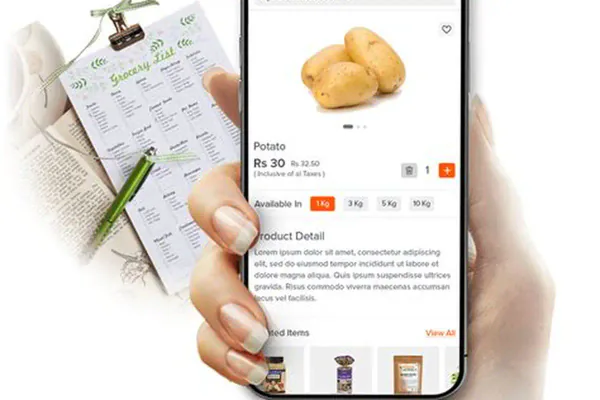
An engaging store is not just a catalog — it is a place where customers can participate. Interaction features like reviews, wishlists, Q&A sections, and back-in-stock alerts make the shopping experience feel alive and responsive.
Enable Wishlists and Save-for-Later Features
Wishlists let shoppers bookmark interest without committing to a purchase. They also give you data — products with many saves are popular but may have a price or availability barrier worth addressing. When you follow up with a sale or restock notification on a saved item, the conversion rate is significantly higher than cold traffic.
Add Back-in-Stock Alerts
If a product goes out of stock, let customers sign up for a restock notification. This captures intent, builds a list of warm buyers, and creates a natural re-engagement moment when the product returns. It also signals that your inventory is actively managed.
Use Post-Purchase Follow-Up
An email sent a week or two after delivery to check satisfaction, offer a related product, or simply thank the customer keeps the relationship active beyond the transaction. Many repeat purchases come from a gentle, well-timed reminder that you exist and that you care.
Improve Navigation and Mobile Experience
Visitors cannot engage with a store they cannot navigate. Poor mobile performance, confusing categories, or a broken search function silently kills engagement regardless of how well-stocked your store is.
Audit Your Categories and Filters
Review your store categories from a customer’s perspective at least once a quarter. Are products easy to find? Are filters working correctly? Clean, logical navigation keeps visitors browsing rather than bouncing.
Test Your Mobile Experience Regularly
Load your store on your own phone every few weeks. Check that images display correctly, buttons are large enough to tap, and the checkout flow is smooth. A mobile experience that feels clunky tells customers the store is not well maintained.
Build a Simple Weekly Store Activity Routine
Consistency separates stores that feel alive from stores that feel abandoned. The following weekly checklist gives you a minimal but effective maintenance routine that keeps your store active without demanding hours of daily work.
Your Weekly Store Maintenance Checklist
- Check for out-of-stock products and update availability or hide listings temporarily.
- Review and respond to any new customer messages or reviews promptly.
- Update one section of the homepage — a featured product, a banner headline, or a promotional note.
- Check your analytics briefly — top pages, bounce rate, and any unusual drops in traffic or conversions.
- Review your promotional calendar — is an upcoming sale, launch, or seasonal event approaching that needs preparation?
- Schedule or publish one piece of content — a guide, a short product post, or a use-case feature.
- Test a few pages on mobile — load speed, image display, and button function.
This routine takes under an hour most weeks. Done consistently, it keeps the store visibly maintained, signals activity to both visitors and search engines, and ensures small problems are caught before they grow into larger ones.
An active, engaging online store is not the result of a single large overhaul. It is the product of small, consistent actions taken week after week. When shoppers visit and find something updated — a fresh promotion, a new review, an accurate stock count, a helpful guide — they build a picture of a store that is worth returning to. That impression compounds over time into repeat business, stronger search rankings, and a brand that customers trust because it shows up reliably. Start with one section from this guide, build the habit, and the results will follow.
