

Managing stock online is not just an operations task. It affects how often customers can buy from you, how quickly you can ship, how much cash stays tied up in storage, and how much trust your store earns over time. When inventory is handled well, customers see accurate availability, orders move smoothly, and your business can grow without constant firefighting. When it is handled poorly, even a store with strong products and good marketing can lose sales through stockouts, overselling, cancellations, and piles of unsold goods.
Many online sellers focus heavily on promotion, pricing, and listing quality, but inventory discipline is what keeps those efforts profitable. A sudden sales spike can empty stock faster than expected. A supplier delay can disrupt your schedule for weeks. A small mismatch between marketplace stock and website stock can lead to oversold items and unhappy buyers. The good news is that most stock problems can be reduced with simple habits, clear rules, and one reliable process that your team follows consistently.
This guide takes a practical approach to product stock management for ecommerce businesses. Instead of treating inventory as a back-office chore, it shows how to build daily and weekly routines that reduce errors, protect cash flow, and make demand easier to handle. Whether you sell through your own store, online marketplaces, or social channels, the goal is the same: keep the right products available at the right time without carrying more stock than your business can realistically move.
Know Your Best-Selling and Slow-Moving Products
The fastest way to improve inventory decisions is to stop treating every product the same. Some items sell steadily every week. Others sell in short bursts. Some bring strong profit margins, while others take up space and cash without helping your bottom line. If you group products based on how they actually perform, your restocking choices become much more accurate.
Sort products by sales speed
Start by reviewing your sales history over the last three to six months. Look at how many units each SKU sells per week or month. This helps you separate products into practical groups such as fast-moving, moderate-moving, and slow-moving items. A fast-moving product deserves closer monitoring and quicker reorder decisions. A slow-moving item needs a more cautious approach so you do not keep adding stock that may sit for too long.
This simple classification improves focus. Instead of checking every item with the same urgency, you give more attention to the products that most often create stock pressure.
Consider margin, not just volume
A product that sells quickly is not always the most important item in your catalog. If an item has a very low margin, carrying too much of it may not help cash flow. On the other hand, a product with moderate sales but strong profit per unit may deserve higher priority. Good stock management combines sales velocity and profit contribution, not just unit count.
Ask practical questions:
- Which items sell frequently and drive repeat orders?
- Which items generate the healthiest margin?
- Which products often lead to add-on purchases?
- Which items are expensive to store or slow to replace?
Factor in seasonality and events
Some products appear slow only because you are reviewing them in the wrong season. Holiday goods, weather-related items, gift bundles, school-related products, and event-based merchandise often follow predictable patterns. If you do not account for seasonality, you may understock before a peak period or overstock right after it ends.
Keep short notes for products with clear demand cycles. Over time, these notes become more useful than memory. They help you remember when orders usually rise, when customers start shopping early, and when demand slows enough to reduce reorders.
Create action groups for better decisions
Once you understand product behavior, assign each SKU to an action group. For example:
- Core stock: steady sellers that should rarely go out of stock
- Growth stock: promising items with rising demand that need closer monitoring
- Seasonal stock: products ordered according to a calendar or campaign cycle
- Slow stock: items that need tighter reorder control or possible clearance planning
This approach keeps your inventory thinking practical. You are no longer guessing what deserves attention. You are building stock decisions around real demand patterns.
Set Clear Reorder Points and Safety Stock Levels
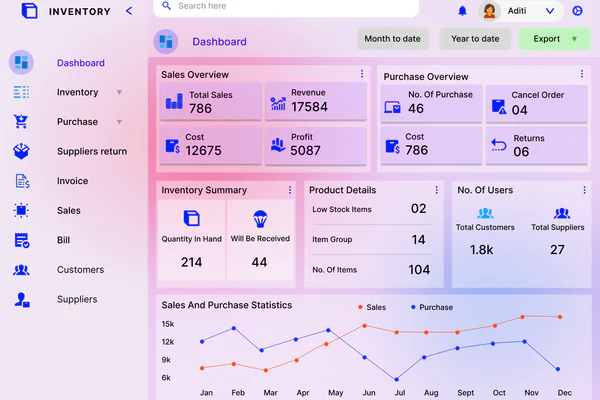
One of the most common stock mistakes is waiting until inventory feels low before placing a new order. That method works only when demand is perfectly stable and suppliers are always on time, which is rarely the case. A better system uses reorder points and safety stock so you know when to act before inventory becomes a problem.
Understand reorder points in simple terms
A reorder point is the stock level that tells you it is time to place a new purchase order. It should be based on how fast a product sells and how long it takes for replacement stock to arrive. If you reorder too late, you risk a stockout. If you reorder too early, you may carry more stock than necessary.
A simple way to think about it is:
Reorder point = average demand during supplier lead time + safety stock
You do not need advanced software to begin. Even a spreadsheet can help you set minimum levels for your most important items.
Use safety stock as a buffer, not a guess
Safety stock is the extra inventory you keep to protect against uncertainty. That uncertainty may come from supplier delays, sudden demand increases, damaged goods, or inventory count errors. Without a buffer, even a small disruption can leave your store out of stock.
The key is to keep safety stock intentional. Too little leaves you exposed. Too much creates dead stock and ties up capital. Start by giving higher safety stock levels to products that:
- sell quickly and consistently
- have long or unreliable supplier lead times
- are difficult to replace locally
- matter heavily to customer satisfaction or repeat buying
Adjust thresholds by product type
Not every product needs the same reorder rule. A low-cost accessory that sells daily may need frequent replenishment and a strong buffer. A bulky product with irregular demand may need a higher reorder threshold only during peak periods. Review thresholds by product category, sales channel, and season rather than applying one fixed rule across your entire catalog.
Plan reorder timing around real lead times
Many sellers underestimate lead time because they count only shipping days. In reality, lead time may also include order processing, supplier preparation, customs clearance, local receiving, and internal stock updates. If a supplier says delivery takes seven days, but your products are not ready for sale until day twelve, then twelve days is the number that matters for inventory planning.
Track the real time from order placement to stock availability. That one habit makes reorder points much more accurate and helps prevent last-minute buying decisions.
Use One Reliable Inventory System Across All Sales Channels
Online sellers rarely use just one channel forever. Many start with a single store and later add a marketplace, social selling platform, or wholesale workflow. Growth is good, but disconnected inventory tracking creates risk. If each channel has different stock numbers, overselling becomes much more likely.
Centralize stock data
Your inventory system should act as the single source of truth for every product and variant. Even if you are not ready for advanced inventory software, the principle still matters: one reliable record should control stock updates. Avoid situations where the website, marketplace, spreadsheet, and warehouse notes all show different quantities.
A centralized system helps you answer basic but critical questions immediately:
- How many sellable units do I actually have?
- How much stock is reserved for open orders?
- Which channel sold the item?
- Has the latest purchase order already been received?
Sync inventory in near real time
Stock accuracy drops quickly when updates happen only once or twice a day. If possible, choose tools or workflows that reduce manual delay between a sale and an inventory deduction. The more channels you use, the more important sync speed becomes.
This is especially important for businesses selling limited quantities, product variants, bundles, or handmade items. In those cases, even a short delay can lead to selling inventory that no longer exists.
Separate available, reserved, and incoming stock
One reason inventory data becomes confusing is that sellers treat all units as if they are equally available. In practice, you should separate stock into at least three groups:
- Available stock: units ready to sell now
- Reserved stock: units already committed to open orders
- Incoming stock: units ordered from suppliers but not yet ready for sale
This distinction improves decision-making. For example, you may appear to have enough total stock, but if most of it is reserved or still in transit, you still have a short-term availability problem.
Reduce manual stock edits
Manual inventory changes create hidden errors, especially when multiple people are involved. Limit who can adjust stock numbers and require a reason for every manual change, such as damaged goods, returns, found stock, or receiving errors. A clear change history helps you investigate discrepancies instead of guessing where they came from.
Audit Stock Regularly Instead of Waiting for Big Problems
Inventory errors rarely appear all at once. They build slowly through small mistakes: a returned item not added back correctly, a damaged unit still counted as sellable, a receiving count entered wrong, or an unrecorded sample sent out. If you wait for a major mismatch before checking stock, you usually discover the issue after it has already affected customers.
Use cycle counts for steady control
A full physical stock count can be useful, but it is often disruptive. A more practical approach is cycle counting, where you count a small portion of inventory on a regular schedule. For example, you might count your top sellers weekly, medium-priority items every two weeks, and slower products monthly.
Cycle counts work because they catch errors earlier. Instead of discovering a problem months later, you can investigate it while the cause is still recent enough to understand.
Audit high-risk items first
Some products deserve more frequent review than others. Prioritize items that are easy to mispick, frequently returned, sold in multiple variants, or popular across several channels. Also watch products with similar packaging or names, because they are more likely to be mixed up during fulfillment.
High-risk stock should be audited with extra discipline. A small counting error on a fast-selling variant can create repeated overselling if it goes unnoticed.
Reconcile differences immediately
The purpose of an audit is not just to count items. It is to explain differences and fix the process that caused them. When stock numbers do not match, ask:
- Was a sale recorded correctly?
- Was incoming stock received in full?
- Was there damage, shrinkage, or a picking mistake?
- Was a return processed but not restocked correctly?
- Did someone make a manual adjustment without documentation?
Do not simply correct the number and move on. If you do, the same error will happen again.
Build an audit calendar
Consistency matters more than complexity. A simple audit schedule often works better than an ambitious system that no one follows. Assign a recurring routine for counts, discrepancy reviews, and corrective actions. Keep it visible so the team treats inventory checking as a normal part of operations rather than an occasional cleanup project.
Improve Product Listings and SKU Organization
Inventory management is closely connected to how products are named, grouped, and identified. Poor SKU structure and messy variant labels create picking errors, counting confusion, and incorrect stock updates. Clean organization makes your inventory system faster and more reliable even before you buy any new tool.
Create logical SKUs
A good SKU system helps staff recognize product details at a glance. It does not need to be complicated, but it should be consistent. For example, a SKU structure might include product type, collection, color, size, or pack quantity in a fixed order.
Strong SKU habits make it easier to:
- identify the right item during receiving and packing
- distinguish product variants clearly
- search inventory records quickly
- spot duplicate or outdated listings
Standardize naming across channels
If one marketplace uses a shortened product name, your store uses a longer version, and your warehouse uses a nickname, errors become more likely. Keep names, variants, and SKU references aligned wherever possible. The goal is that everyone, from the inventory manager to the picker to the customer service team, refers to the same item in the same way.
Manage variants carefully
Variants such as size, color, flavor, or material often cause stock confusion because the parent product looks simple while each option carries separate inventory. Make sure every variant has its own clear SKU and stock count. Avoid vague labels like “Blue 1” or “Large B” if they can be confused with similar products.
When variants share packaging, add a clear visual or code-based distinction in storage locations too. Inventory accuracy depends on warehouse reality matching your digital records.
Use barcode habits if volume is growing
You do not need enterprise-scale operations to benefit from barcodes. Even a small ecommerce business can reduce mistakes by scanning products during receiving, picking, or counting. Barcode-based workflows create fewer manual entry errors and speed up repetitive tasks.
If your product count is expanding, barcode support can be one of the simplest upgrades that improves daily inventory discipline.
Plan for Promotions, Seasonal Peaks, and Supplier Delays

Inventory problems often become visible during busy periods, but the real cause is usually weak planning before the rush begins. Promotions, festive seasons, major shopping events, viral products, and supplier disruptions all change demand patterns. Stores that plan early protect both sales and customer experience.
Forecast around events, not just averages
Average weekly sales are useful, but they can hide important spikes. If you run a discount campaign, launch a bundle, or participate in a marketplace event, historical averages may no longer be enough. Build short-term forecasts that reflect the expected impact of each event.
Look back at similar periods and ask:
- How much did traffic increase?
- Which products sold faster than normal?
- Did customers buy more bundles or accessories?
- How long did the sales lift last after the campaign ended?
This lets you raise stock levels where demand is likely to move, instead of over-ordering every product equally.
Prepare for supplier risk
Even a strong sales forecast can fail if supply is unreliable. Delays may come from production bottlenecks, holidays, transport issues, customs, or supplier stockouts. For critical products, keep a record of which suppliers are dependable, which tend to delay, and which require larger lead-time buffers.
Where possible, reduce risk through practical measures:
- place orders earlier before major selling periods
- keep larger safety stock for critical SKUs
- identify backup suppliers for core items
- avoid depending on a single supplier for your best seller
Coordinate promotions with inventory reality
Marketing and inventory should never operate in isolation. If a product is about to be featured in an ad campaign, homepage banner, marketplace promotion, or influencer collaboration, stock planning should happen first. Running a successful campaign on low stock may boost traffic but still damage trust if customers see sellouts or delayed delivery.
Before launching any campaign, confirm available stock, incoming stock, reorder timing, and any fulfillment constraints. That coordination turns promotions into profitable growth instead of operational stress.
Have a plan for slow stock after peak periods
Not every forecast is perfect. After a promotion or seasonal period, review what remains. Some leftover stock can support normal sales, but some may need a deliberate exit plan. If you consistently ignore post-peak overstock, your storage space and working capital get weaker over time.
Create a simple rule for post-event review: decide whether to keep, bundle, discount, repurpose, or discontinue products that no longer justify their stock level.
Track Inventory Metrics That Lead to Better Decisions
Good stock management improves when you measure more than just how many units are left on the shelf. A few practical inventory metrics can show whether your buying habits, sales forecasting, and operational routines are actually working.
Focus on useful metrics
You do not need a complicated dashboard full of ratios. Start with the metrics that directly affect stock decisions:
- Sell-through rate: how much of received stock you sell within a given period
- Stock turnover: how often inventory is sold and replaced
- Stockout rate: how often products become unavailable when customers want to buy
- Days of inventory on hand: how long current stock may last at the current sales pace
- Return rate: how often sold items come back and disrupt usable stock
These numbers help you spot issues that are not obvious from a basic quantity report.
Read the story behind the numbers
A metric matters only if it leads to action. For example, a high stock turnover may be positive, but if it comes with frequent stockouts, you may actually be under-ordering. A low sell-through rate may suggest overbuying, poor product-market fit, or a seasonal mismatch. A rising return rate may signal product quality issues or inaccurate variant handling that also affects stock accuracy.
Use metrics as decision tools, not decoration. Review them regularly and ask what inventory behavior each number is pointing to.
Compare performance by product group
Inventory metrics become more useful when grouped by category, supplier, or stock class. If slow-moving products from one supplier consistently sit longer than expected, you may need smaller orders or different terms. If one category has a much higher stockout rate, your reorder thresholds may be too conservative.
Segmented reporting gives you clearer answers than one store-wide average.
Set target ranges
Metrics are easiest to use when you define what healthy performance looks like. Not every product needs the same target, but each group should have a reasonable range. That makes it easier to identify which items need action now and which ones are performing as expected.
For example, you can set internal targets for acceptable stockout frequency, minimum sell-through on new stock, or maximum days on hand for slow-moving lines. These targets create accountability and reduce decision-making based on guesswork alone.
Build a Simple Routine Your Team Can Follow
The strongest inventory strategy still fails if it depends on memory, urgency, or one person doing everything manually. The real goal is to create a repeatable routine that keeps stock accurate without constant crisis management. Simple routines work because they reduce decision fatigue and make good habits normal.
Create a weekly inventory checklist
A weekly routine keeps your store responsive to short-term changes. It does not have to be long. What matters is that it is followed consistently. A useful weekly checklist might include:
- review fast-selling SKUs and days of stock remaining
- check items at or below reorder point
- confirm status of incoming purchase orders
- investigate stock discrepancies and manual adjustments
- review stock reserved for unshipped or delayed orders
- update demand assumptions for active promotions
This kind of review often takes far less time than fixing stock problems after they affect customers.
Set a monthly deeper review
Monthly reviews should focus on patterns rather than daily movement. Use them to assess slow-moving stock, supplier performance, dead stock risk, and category-level metrics. This is also the right time to review whether reorder points, safety stock rules, and storage organization still make sense.
A monthly review helps you improve the system itself, not just react to its output.
Assign clear ownership
If everyone is loosely responsible for inventory, no one is truly accountable. Define who handles reordering, who confirms received stock, who reviews discrepancies, and who updates listings or SKU records. Even in a small business, clear responsibility prevents tasks from being missed or duplicated.
Ownership should also include escalation rules. For example, who decides when to stop promoting an item due to low stock? Who approves urgent restocking? Who investigates recurring count errors? These decisions should not be made differently every week.
Document the process in plain language
Your stock process does not need a complicated manual, but it should be written down clearly enough that another team member can follow it. Document the essential steps for receiving stock, updating quantities, handling returns, conducting counts, and making manual adjustments.
Plain-language documentation protects your business when staff changes, order volume rises, or seasonal workers join temporarily. It also makes training faster and reduces process drift over time.
Conclusion
Practical stock management is really about discipline, visibility, and timing. When you know which products move fastest, set clear reorder points, centralize inventory data, audit regularly, organize SKUs well, and plan ahead for demand changes, inventory becomes much easier to control. The result is fewer cancelled orders, fewer emergency purchases, better cash flow, and a more reliable customer experience.
Online sellers do not need perfect forecasting or expensive systems to improve inventory performance. What they need is a consistent process that turns stock management into a routine rather than a reaction. Start with your most important products, tighten the habits that affect daily accuracy, and build from there. Over time, even small improvements in how you manage product stock online can create a stronger, more profitable ecommerce operation.
