

Customer service in ecommerce is not just about being polite after a problem happens. It is part of the buying experience itself. Shoppers judge your store by how easy it is to get answers, how clearly expectations are set, how quickly issues are resolved, and how confident they feel placing a second order. A store with average products can still earn repeat customers through dependable support, while a store with strong products can lose revenue fast if help feels slow, confusing, or inconsistent.
That is why improving customer service in your ecommerce store should be treated as an operational priority, not a side task. Better service reduces refund pressure, lowers support friction, improves reviews, and increases customer lifetime value. It also saves internal time because fewer conversations go in circles when customers can find what they need, policies are easy to understand, and your team has a clear way to resolve common issues.
This guide focuses on the practical side of ecommerce customer service: store setup, support channels, policy clarity, team training, automation, personalization, complaint recovery, and service metrics. The goal is simple. Build a support system that helps customers quickly, protects trust, and turns service into a retention driver instead of a cost center.
Make It Easy for Customers to Get Help
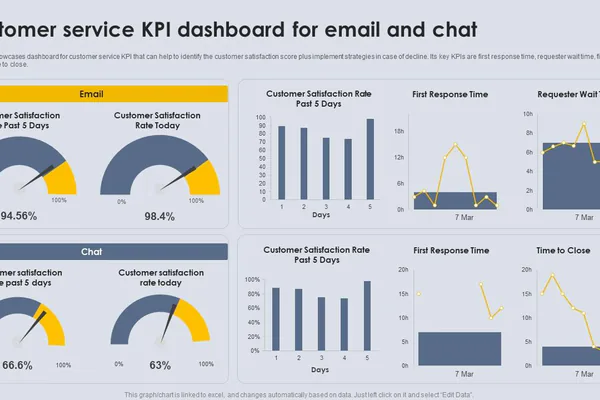
The fastest way to improve customer service is to reduce customer effort. Many support problems start before a customer even contacts you. If shoppers cannot find delivery information, return rules, tracking links, or contact options, frustration builds early. By the time they send a message, they are already less patient and less trusting.
Place help where buying decisions happen
Your support options should be visible in the parts of the store where customers naturally look for reassurance. That includes product pages, the cart, checkout, order confirmation emails, account pages, and the website footer. A hidden contact page is not enough. If someone is wondering about delivery speed or return eligibility on a product page, they should not have to search your entire site for an answer.
A simple rule works well here: put relevant help next to the action it supports. Shipping details belong near pricing and delivery estimates. Return information should appear before checkout, not only inside a long legal page. Order tracking should be linked inside confirmation emails and customer accounts. When support is embedded into the buying journey, customers feel that the store is prepared and reliable.
Create a self-service path that actually works
Many stores publish an FAQ, but few make it genuinely useful. A good help center is organized around customer intent, not internal categories. Instead of vague topics like General Questions, use clear labels such as Track My Order, Change My Shipping Address, Start a Return, or What Happens If My Package Is Delayed. Customers scan for solutions, so structure matters as much as the content itself.
- Include a visible search bar in the help section.
- Link to the most common service pages from the footer and account area.
- Use short answers first, then add detail only where needed.
- Update FAQs when a question appears repeatedly in tickets.
- Make sure all help pages work well on mobile devices.
Self-service is not about pushing customers away from human support. It is about removing unnecessary friction so agents can spend time on cases that truly need judgment, reassurance, or exception handling.
Remove dead ends from the post-purchase experience
The period after checkout is when support demand usually rises. Customers want to confirm payment, follow shipping progress, understand delivery timing, and know what to do if something changes. If order confirmation emails are too thin, tracking links are hard to find, or status updates are vague, your inbox fills with avoidable messages.
Review your post-purchase flow and ask a direct question: Can a customer solve the top five common concerns without contacting us? If the answer is no, improve the flow first. That one change often reduces support volume faster than hiring more agents.
Respond Faster With the Right Support Channels
Customers do not expect every store to offer support everywhere, but they do expect the channels you provide to be reliable. Slow, unmanaged support channels create more damage than a smaller but well-run channel mix. The goal is not maximum channel count. The goal is speed, clarity, and consistency.
Match each channel to the type of issue
Email works well for detailed cases, attachments, and non-urgent requests. Live chat is useful for pre-purchase questions, simple account help, and quick order checks. Contact forms help standardize incoming information, which improves triage. Social media messages can support brand visibility, but they should not become your main service desk unless your team can monitor them properly.
Think about the nature of your products and customers. A store selling custom products may need more pre-sale support. A store shipping fast-moving consumer goods may need stronger post-purchase tracking and delivery issue handling. Choose channels that fit your store reality rather than copying larger brands with bigger teams.
Set response expectations you can keep
One of the easiest ways to improve customer satisfaction is to communicate realistic response windows. Customers feel less anxious when they know what to expect. A confirmation message that says We reply within 4 business hours is better than silence. It sets a standard and gives your team a measurable target.
Response speed matters, but predictability matters too. A store that consistently replies in six hours often feels more trustworthy than a store that replies in ten minutes one day and two days later the next. Build service levels around your actual staffing capacity, then improve them over time.
Use triage rules to protect speed
Not all tickets deserve the same handling path. A good triage process separates urgent service risks from simple requests. For example, payment problems, missing orders, and damaged item reports should be prioritized over routine questions already answered in your FAQ. Without triage, urgent cases get buried and customer frustration grows.
- Tag tickets by issue type as soon as they arrive.
- Route high-risk cases to experienced staff.
- Use templates for repetitive questions to save time.
- Escalate exceptions quickly instead of forcing long back-and-forth exchanges.
When channel management and triage are aligned, your team can respond faster without sacrificing quality.
Write Clear Policies That Prevent Frustration
Many support conversations begin because store policies are technically present but practically unclear. Customers do not read policies like lawyers. They scan for specific answers that affect their money, time, and risk. If shipping, return, refund, or exchange terms are vague, support teams end up translating policies one conversation at a time.
Turn shipping information into plain-language guidance
Customers mainly want to know three things about shipping: how much it costs, how long it takes, and what might delay it. If your shipping page only lists generic statements, people will message you for clarification. Replace broad language with direct explanations that reflect real store operations.
For example, distinguish between processing time and transit time. State whether delivery estimates exclude weekends or holidays. Explain how pre-orders, custom items, or split shipments work. If tracking updates can lag, say so upfront. Clear shipping guidance does not eliminate delays, but it prevents confusion and reduces the feeling that something is being hidden.
Make returns and refunds easy to understand
Return policies are one of the strongest trust signals in ecommerce. A clear policy can increase conversion before a sale and reduce conflict after a sale. Customers should understand eligibility, deadlines, item condition requirements, refund timing, exchange options, and who pays return shipping.
- Use short paragraphs and bullet points instead of dense legal blocks.
- State the return window prominently.
- Explain the steps to start a return in order.
- Clarify when refunds are issued and where the money goes.
- List any exceptions without sounding evasive.
Policies should protect the business, but they should not read like traps. If customers feel that rules are designed to stop legitimate claims, service conversations become defensive from the start.
Align your policy language with support outcomes
A policy is only useful if your team can apply it consistently. If your return page promises flexibility but your agents lack authority to act, customers receive mixed signals. On the other hand, if the policy is strict but agents make random exceptions, customers learn that escalation is the real process. Both situations weaken trust.
Review policy wording with your support workflow in mind. If an exception exists for damaged items, late deliveries, or carrier errors, define it internally. Good customer service depends on clear rules, but also on knowing when the rule should bend to preserve the relationship.
Train Your Team to Solve Problems, Not Just Answer Questions
Customer service quality depends less on scripts than on judgment. A support team becomes valuable when it can interpret context, reduce tension, and move cases to resolution. That requires training that goes beyond product facts and canned responses.
Build deep product and process knowledge
Agents should understand the products, order flow, fulfillment stages, policy details, and common failure points in your store. When a customer says an item looks different from the listing, the agent should know the likely cause. When a shipment is delayed, the agent should know whether the issue is internal processing, courier scanning, or customer address error. Knowledge shortens conversations and improves confidence.
Create a simple internal knowledge base covering the most frequent service scenarios. Keep answers short, practical, and regularly updated. A lightweight internal guide is often more useful than a large manual nobody reads.
Teach empathy with structure, not empty phrases
Customers want to feel understood, but they do not need exaggerated apologies. Effective empathy is specific. It acknowledges the inconvenience, explains the next step, and gives a realistic timeline. Compare a vague message like We are sorry for any inconvenience with a more grounded response that identifies the issue and what will happen next. The second approach feels more human because it is actionable.
Train agents to do three things well: recognize the customer concern, take ownership of the path forward, and avoid defensive wording. This is especially important when the business is not fully at fault. Even when a courier, supplier, or payment processor caused the problem, the customer still experiences it through your store.
Give agents decision rights for common cases
Nothing slows service more than constant approval bottlenecks. If every damaged item claim, shipping delay, or small refund requires manager review, queues expand and customers wait. Define decision thresholds so frontline staff can resolve routine issues confidently.
Examples of decision rules might include allowing support agents to reship low-cost items, issue store credit within a set limit, waive small fees for obvious fulfillment errors, or prioritize replacements for loyal repeat buyers. Clear authority makes service faster and more consistent while reducing internal friction.
Use Automation Without Sounding Robotic
Automation can improve customer service dramatically when it removes repetitive work and speeds up straightforward tasks. It becomes harmful when it traps customers in loops, sends irrelevant replies, or hides human contact. The best ecommerce automation feels efficient, not cold.
Automate status updates and repetitive workflows
Automatic order confirmations, shipping notifications, delivery updates, return status emails, and refund confirmations are high-value automations because they answer common customer concerns before a ticket is created. These messages should be clear, specific, and timed correctly. A late or generic automated message can increase confusion instead of reducing it.
Good automation tells customers what happened, what it means, and what to do next. For example, if a return was received but not yet inspected, say that directly. If a refund takes several business days to appear, explain that in advance. Automation works best when it removes uncertainty.
Use templates as support tools, not final answers
Saved replies and macros help teams move faster, but they should be editable. Rigid templates create a mechanical tone and often miss the actual issue. A better approach is to use structured templates with room for customer-specific details such as name, order status, product type, or next-step timeline.
Templates should give agents a strong starting point, not replace thought. Review them regularly. If customers still ask follow-up questions after receiving a macro, the template is probably incomplete or unclear.
Know when a human should take over
Automation should handle simple intent detection, basic status checks, and repeated process guidance. Human support should step in when emotion, complexity, or exception handling becomes important. Complaints about damaged items, missing packages, duplicate charges, or repeated failed attempts at resolution should not remain stuck in automated flows.
A useful standard is this: if the customer needs reassurance, interpretation, or a discretionary decision, route the case to a person quickly. Automation should reduce workload, not create distance.
Personalize Support With Order and Customer Context
Customers expect support to know who they are, what they ordered, and what has already happened. Asking people to repeat information that your store already has is one of the quickest ways to make service feel inefficient. Personalization in support is not about marketing language. It is about context.
Bring order data into the conversation
When an agent can immediately see order date, payment status, shipping stage, previous tickets, and product details, the conversation becomes shorter and more relevant. Customers should not have to explain their order history from the beginning each time they ask for help. If your tools are fragmented, even simple integrations between your store platform, email system, and help desk can improve speed significantly.
Context also helps agents avoid tone mistakes. A first-time shopper asking about a delivery estimate may need reassurance. A repeat customer with two recent shipping issues may need a retention-minded resolution. The same script should not be used for both cases.
Use previous interactions to reduce repetition
If a customer has already contacted you about the same issue, acknowledge that history and move forward. Reopening the case from zero makes customers feel ignored. Even a simple line that references the prior conversation shows continuity and competence.
Repeated contact also signals operational weaknesses. If customers are asking the same thing multiple times, the problem may not be communication alone. It may indicate unclear tracking, slow internal handoff, or missing ownership. Personalized support helps the individual case, but it also reveals system-level problems that should be fixed upstream.
Recognize customer value without being transactional
Not every customer should receive the same recovery offer in every situation. Loyal buyers, subscription customers, or high-value shoppers may deserve faster escalation or more flexible recovery options. That does not mean unfair treatment. It means understanding relationship context when making service decisions.
Personalization becomes powerful when it supports retention. If a long-time customer experiences a fulfillment error, a quick replacement, proactive update, or thoughtful credit can preserve far more future revenue than the immediate cost of the fix.
Turn Complaints Into Loyalty Opportunities
Complaints are unavoidable in ecommerce. Packages get delayed, products arrive damaged, addresses are entered incorrectly, and expectations sometimes fail to match reality. The stores that win long term are not the ones with zero issues. They are the ones that recover well when issues happen.
Respond to the problem and the emotion
When customers complain, they usually want two things at the same time: a solution and confidence that the solution will actually happen. If you only address the transaction, the response can feel cold. If you only apologize, the response feels weak. Strong service recovery combines acknowledgment, action, and timeline.
- State the issue clearly so the customer knows you understood it.
- Explain the next step without vague language.
- Give a realistic timeframe for the resolution.
- Follow up until the issue is closed, not just handed off.
This simple recovery structure reduces uncertainty, which is often the real source of anger.
Use service failures to prove reliability
A wrong order or damaged shipment is a negative moment, but it is also a chance to demonstrate standards. Fast replacement, clear updates, easy photo verification, and low-friction resolution can leave a stronger impression than a flawless but forgettable transaction. Customers remember how you behave when things go wrong.
That is why complaint handling should be designed, not improvised. Create playbooks for delayed orders, lost packages, missing items, defective products, and refund disputes. Your team should know the response path, evidence requirements, compensation options, and escalation rules before the complaint arrives.
Manage public feedback with calm and clarity
Negative reviews and public comments are part of ecommerce service now. The mistake many stores make is treating public replies as arguments to win. A better approach is to show professionalism, acknowledge the issue, and invite resolution through the appropriate channel. Future shoppers read those replies as signals of how your brand behaves under pressure.
You do not need to confess fault publicly in every case. You do need to show that the business is responsive, fair, and solution-focused. A measured public response can protect trust even when the original complaint is harsh.
Track the Metrics That Actually Improve Service
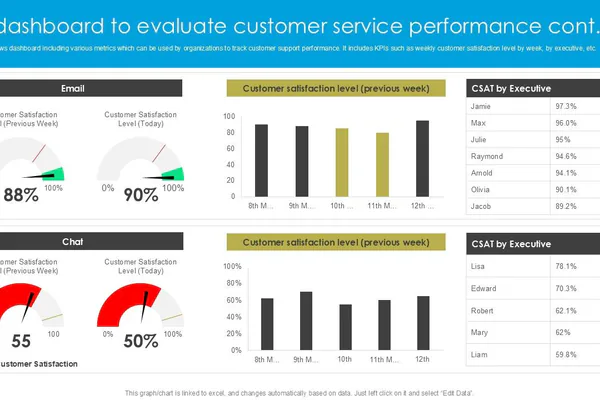
Customer service improves faster when it is measured well. Many ecommerce stores track ticket volume but ignore the metrics that reveal friction, quality, and retention impact. The right metrics help you decide whether the issue is staffing, policy design, checkout communication, or fulfillment reliability.
Monitor speed and resolution metrics
Start with a small set of operational numbers that are easy to understand and act on. First response time shows how quickly customers hear back. Resolution time shows how long issues stay open. Backlog size shows whether the team is keeping up. Reopen rate shows whether issues are being solved properly the first time.
These metrics are useful because they expose process delays. If first response is fast but resolution is slow, the problem may be weak authority, poor internal coordination, or slow handoffs. If resolution is fast but satisfaction is low, your answers may be efficient but not actually helpful.
Measure quality and business impact
Operational speed matters, but it is not enough. You should also look at customer satisfaction scores, common complaint themes, refund-related contact rates, repeat purchase behavior after support interactions, and the percentage of contacts that could have been prevented through better information. These measures connect service performance to business outcomes.
- Track the top reasons customers contact support each month.
- Identify which issues create the most refunds or cancellations.
- Compare repeat purchase rates for customers with positive and negative service experiences.
- Review whether support demand spikes after specific promotions, product launches, or shipping changes.
This kind of analysis helps you improve the store itself, not just the support desk.
Look for patterns, not isolated incidents
One angry message does not always signal a broken process. Fifty similar tickets usually do. Group your service data into themes such as shipping confusion, sizing uncertainty, damaged packaging, payment failures, or return delays. Patterns reveal where service improvement and store optimization overlap.
For example, if many tickets ask when an order will ship, the issue may be poor order status communication. If return questions concentrate around one product category, the issue may be inaccurate expectations on the product page. Support data is one of the best diagnostic tools in ecommerce when it is categorized and reviewed regularly.
Build a Simple Improvement Plan for the Next 30 Days
Customer service gets better through small operational changes applied consistently. You do not need a large team or expensive software to make progress. What you need is a focused plan that removes friction first, then strengthens systems.
Week 1: Audit the customer journey
Review the full support experience from product page to post-delivery follow-up. Check whether contact options are visible, FAQs are useful, order emails are informative, and policy pages are understandable. Look for points where customers are likely to hesitate or contact you unnecessarily.
Week 2: Improve speed and consistency
Define response targets for each channel. Set up ticket tags, priority rules, and a small library of editable templates for common cases. Make sure every support message includes clear next steps and timelines.
Week 3: Strengthen policy and recovery workflows
Rewrite shipping, return, exchange, and refund explanations in plain English. Create internal playbooks for delayed orders, damaged goods, wrong items, and repeat-contact cases. Give staff authority to resolve routine problems without slow approvals.
Week 4: Measure and refine
Start tracking first response time, resolution time, satisfaction trends, and top ticket reasons. Use the results to choose the next improvements. If one issue creates a high share of contacts, fix the root cause in the store or fulfillment process instead of answering the same complaint forever.
A practical 30-day checklist can look like this:
- Move support links to high-visibility store locations.
- Improve order confirmation and tracking communications.
- Rewrite your top three policy pages for clarity.
- Create decision rules for the most common support problems.
- Set channel response targets and monitor them weekly.
- Categorize tickets by root cause and review the patterns monthly.
This kind of plan is manageable, measurable, and much more effective than trying to overhaul everything at once.
Conclusion
Learning how to improve customer service in your ecommerce store is really about designing a better customer experience before, during, and after the sale. Clear help paths, reliable response channels, simple policies, well-trained staff, smart automation, useful personalization, and meaningful metrics all work together. When those pieces are aligned, support becomes faster for your team and easier for your customers.
The biggest advantage is not only fewer complaints. It is stronger trust. Customers who feel informed, respected, and well supported are more likely to buy again, recommend your store, and stay loyal when small problems happen. In ecommerce, that kind of service is not just a support function. It is a growth system.
